Photo-Based AI Lighting Selection: Transform Your Space
Ever walked into a room and felt an instant "aha!" moment? That's the magic of great lighting. It’s not just about seeing; it’s about *feeling*. Lighting sets the mood, highlights your favorite decor, and can even influence your productivity and well-being. Yet, for most of us, choosing the perfect lights feels like a shot in the dark (pun absolutely intended!). We rely on guesswork, showroom floor models that look nothing like our living rooms, or the vague hope that what we *think* will work, actually *will*. This often leads to costly mistakes, endless returns, and spaces that feel... well, just okay.
But what if you could banish that guesswork for good? What if you could see exactly how a new pendant, a strategically placed floor lamp, or a completely different lighting scheme would transform your space *before* you buy a single bulb? Enter the game-changer: AI-powered, photo-based lighting selection. This revolutionary approach isn't just about convenience; it's about empowerment. It can slash your planning time by up to 60%, turning a frustrating trial-and-error ordeal into an exciting, creative adventure. This comprehensive guide will illuminate how this incredible technology works, what to expect, and how you can confidently apply it to create the home of your dreams.
Key Takeaways
Ready for the highlights? Here’s the lowdown on how photo-based AI lighting selection is changing the game:
- Your Space, Analyzed: Upload a photo, and AI dives deep, understanding your room's unique features to suggest perfectly tailored lighting.
- Customization at Your Fingertips: Play with styles, colors, and moods. See instant previews of different options without commitment.
- Quality In, Quality Out: Great photos (well-lit, straight-on, clutter-free) are your secret weapon for the most accurate and inspiring results.
- Beyond Basic Previews: Advanced features let you simulate lighting from dawn to dusk, swap fixtures effortlessly, and avoid costly design mishaps.
- Design Like a Pro: High-quality interior planning is no longer exclusive. Photo-based AI makes expert-level lighting design accessible to everyone.
The Basics of Photo-Based Lighting Selection: Your Room, Reimagined
So, we've established that traditional lighting selection can be a real headache. Now, let’s pull back the curtain on how AI steps in to make it not just easier, but genuinely fun and effective.
Photo-based lighting selection is brilliantly simple in concept: you snap a picture of your room, upload it to an AI system, and then watch as that system analyzes, recommends, and even visualizes new lighting possibilities tailored specifically to *your* space. But don't let the simplicity fool you; the mechanics behind it are incredibly sophisticated. This technology leverages advanced computer vision and machine learning algorithms to become your personal, tireless lighting expert. It’s like having an interior designer who can instantly understand your room's DNA and then render endless possibilities.
What exactly does this digital wizardry "see" in your photo? Far more than you might imagine! A modern AI system will meticulously scan your image for a wealth of critical data points:
- Architectural Elements: It maps your room's layout, ceiling height, wall positions, and even the nuances between an open-plan space and distinct zones.
- Natural Light Analysis: Crucially, it identifies window placement, the direction of natural light, and how intensely it interacts with your room throughout the day.
- Shadow Play: The AI observes existing shadow intensity and distribution, understanding how light and dark areas are currently formed.
- Material Finishes: It discerns the textures and reflectivity of your surfaces – whether it's a matte painted wall, a glossy tile floor, rich wood grain, or textured fabric – and predicts how different lights will interact with them.
- Existing Fixtures: It notes the positions and types of any current light sources, assessing their contribution to the overall ambiance.
- Color Palette: The system analyzes your room's color scheme, understanding how various light temperatures (warm vs. cool) will subtly shift those hues.
This level of detailed analysis means the AI isn't just pulling generic lights from a catalog. It's providing suggestions that are genuinely responsive to your home's unique architecture, existing decor, and personal style. It's about creating a harmonious visual symphony, not just adding light.
Traditional vs. AI-driven selection: A Direct Comparison
Let’s put it into perspective. The difference between the old way and the AI way isn't just an upgrade; it's a quantum leap.
| Factor | Traditional Method | AI-Driven Method |
|---|---|---|
| Time to First Suggestion | Days to weeks (researching, store visits, consultations) | Minutes (upload, select, generate) |
| Error Rate (wrong scale, wrong tone) | High (based on imagination, showroom discrepancies) | Significantly reduced (visualized in your actual space) |
| Ability to Iterate Quickly | Limited (physical mock-ups, returns, re-shopping) | Unlimited renders (try endless variations instantly) |
| Personalization to Your Room | Minimal (generic ideas adapted to your space) | Highly specific (tailored to your room's unique features) |
| Visualization Before Purchase | Impossible (rely on imagination, small swatches) | Instant, photorealistic preview |
| Cost of Mistakes | High (returns, restocking fees, re-installation, wasted time) | Negligible (virtual changes cost nothing) |
This isn't just an incremental improvement; it's a generational shift in how we approach home design. Once you experience the power of seeing before buying, you'll wonder how you ever managed without it.
How AI Models Bring Your Space to Life: Beyond Imagination
Now that you know what AI can "see," let's delve into the truly magical part: how it takes that information and conjures up new lighting realities in your photo.

The first time you witness your room transform with a new lighting scheme, it feels almost like sorcery. But behind the scenes, sophisticated image-to-image AI models are hard at work. Think of it like this: the AI doesn't just slap a new light fixture onto your photo. Instead, it understands the fundamental physics of light, shadows, and reflections within your existing image. Then, using powerful algorithms, it reconstructs the entire lighting environment, preserving your room's unique geometry, furniture, and textures while introducing entirely new light sources and effects.
These models are trained on vast datasets of images, learning how different lights interact with various materials, colors, and architectural features. When you provide text prompts, like "warm ambient with layered accent lighting" or "cool, north-facing studio setup," the AI uses these cues to guide its reconstruction. You can also select preset styles like "golden hour," "candlelit," or "bright daylight simulation" to instantly explore ready-made moods. The result? Your original room, but with a completely transformed lighting personality, rendered in stunning photorealistic detail.
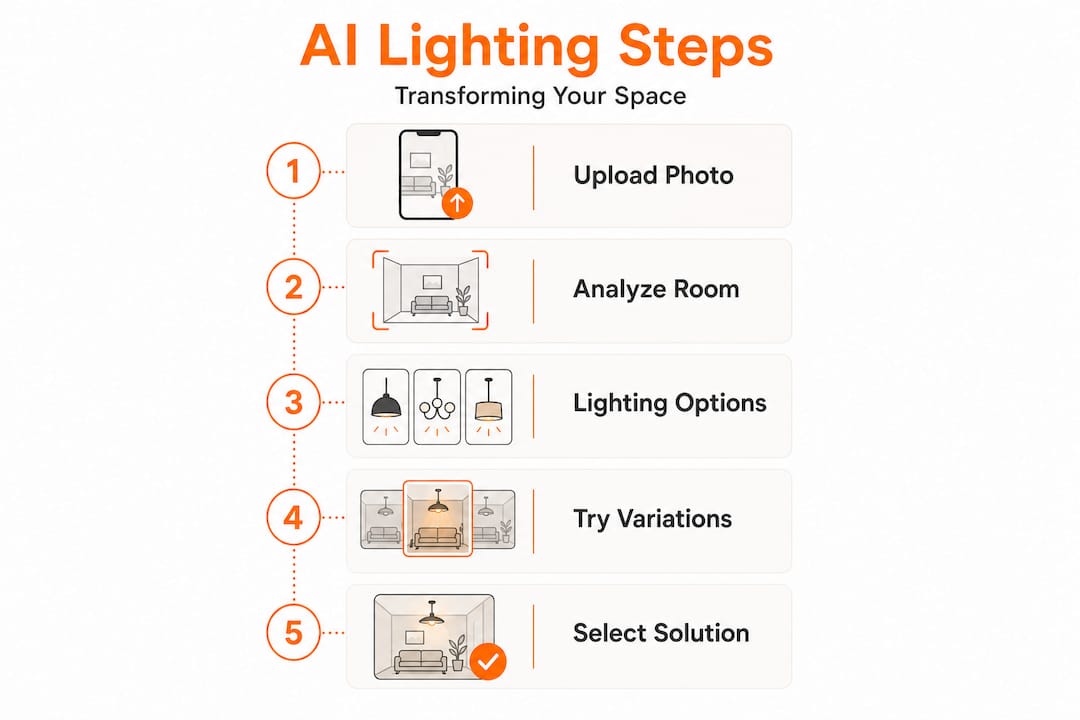
Here’s a step-by-step breakdown of this illuminating process:
- Upload Your Room Photo: The journey begins with a clear, well-lit photograph of your space. A high-quality image provides the AI with the richest dataset to interpret.
- AI Analyzes Spatial Geometry: The model meticulously maps your room’s structure – walls, ceiling height, furniture placement, window openings, and overall dimensions. It builds a 3D understanding from your 2D image.
- Existing Lighting Characteristics are Cataloged: Shadows, reflections, and the general brightness of your current setup are carefully noted, forming a baseline for comparison.
- You Define Your Vision: This is where your creative input shines! You choose a style prompt (e.g., "modern minimalist with soft task lighting") or select from a range of preset moods and lighting temperatures.
- The System Generates a Rendered Preview: In mere moments, the AI presents a photorealistic image of your actual room, complete with the new lighting scheme applied.
- Iterate, Refine, Explore: This is the true power. Not quite right? Adjust the color temperature, swap out a fixture, shift from general ambient to a more accent-heavy plan. Regenerate until you hit that perfect "aha!" moment.
“The shift from imagining a lighting setup to actually seeing it rendered into your living room in seconds is the kind of leap that changes how people relate to their own spaces. It’s not just convenience. It’s creative freedom at a level that was previously reserved for professionals with expensive visualization software.”
That iterative loop is where the real magic lives. Many people treat their first render as the final result, but the true potential of personalized lighting solutions comes from treating that initial image as a launching pad for endless possibilities.
Pro Tip: Don’t settle for your first AI render! Generate at least three distinct variations. Try one cooler, one warmer, and one with a focus on layered accent lighting. Comparing these diverse versions often reveals a preference or an idea you hadn't even considered, guiding you to a truly inspired outcome.
Practical Tips for Preparing and Using Your Room Photos: Your Input, Your Impact
To unlock the full potential of AI-powered lighting tools, starting with the right kind of photo is absolutely essential. Think of it as giving your AI designer the clearest possible brief.
The old adage "garbage in, garbage out" holds true here. The quality of your input photo directly determines the accuracy and inspiration of your output. This isn't a limitation of the technology itself, but rather a fundamental principle: the AI can only interpret and work with the information it's provided. Common pitfalls, such as poor input photos with extreme lighting (think deep, undifferentiated shadows or completely blown-out highlights), low resolution, or excessive clutter, can confuse the model's spatial mapping and lead to less-than-ideal results. Similarly, photos taken in rooms with unusual natural light exposures (like a heavily shaded north-facing room or a glaring west-facing one) might require more specific prompts to get the desired simulation.
So, what does a "great" input photo look like? Here’s your checklist for success:
- Embrace Natural Daylight: Shoot your photo in ample natural light, ideally on an overcast day or when direct sunlight isn't harshly streaming in. This minimizes extreme contrasts and provides a balanced canvas for the AI.
- Go Straight-On: Take your photo from a relatively straight-on angle, capturing as much of the room as possible without dramatic distortions. Avoid wide-angle lenses or extreme upward/downward shots that can skew proportions.
- Declutter for Clarity: A tidy room helps the AI cleanly identify surfaces, furniture edges, and open areas. Temporarily remove small, distracting items to give the AI a clear view of the structural elements.
- Achieve Balanced Exposure: Ensure your photo isn't overexposed (no pure white, detail-less areas) or underexposed (no completely black, crushed shadows). A well-exposed image retains crucial detail.
- High Resolution is Key: Use the highest resolution your phone or camera allows. More pixels mean more detail, which the AI uses for accurate reflection modeling and material interpretation.
Beyond the visual input, the context you provide the system is equally important. Think of it as adding layers of instruction to your AI designer. Don't just upload the photo; tell it about the room's purpose (e.g., "cozy reading nook," "vibrant home office," "elegant formal dining room"), your desired aesthetic (e.g., "industrial chic," "warm Japandi," "playful bohemian"), and even any functional requirements (e.g., "need task lighting for crafting," "want soft ambient light for relaxation"). This rich context pushes the AI from generic suggestions to truly tailored, insightful recommendations. For more insights on how context aids AI in design, a resource like Architectural Digest's take on AI in interior design can offer further perspectives.
Also, pay close attention to lighting analysis for accuracy when you're dealing with rooms that have unusual proportions or mixed light sources. A long, narrow hallway behaves very differently from a wide, open-plan kitchen, and your photo needs to honestly represent that unique geometry for the AI to provide the best solutions.
Pro Tip: Take a series of photos throughout the day to capture how light naturally shifts from morning through evening in your specific room. Upload each one separately and compare the AI’s recommendations. Rooms that feel warm and golden at noon can read totally differently under overcast afternoon light, and comparing these contrasts can be incredibly insightful for discovering your ideal artificial lighting setup for various times and moods.
Advanced Features: Simulating, Iterating, and Personalizing Your Vision
With the basics and best practices under your belt, let’s explore how the advanced features of photo-based AI truly empower you to personalize your space before you commit to a single purchase.
This is where photo-based AI transforms from a clever trick into a serious, indispensable design tool. Modern platforms go far beyond simple fixture swaps. They can now simulate a precise spectrum of lighting temperatures, allowing you to fine-tune the ambiance from a cozy 2700K (think warm, amber glow) ideal for intimate living rooms or bedrooms, to a crisp 3000K-3500K (cleaner, more neutral white) perfect for task-oriented spaces like kitchens where cooler lights can make food look unappealing, or even a brighter 4000K for a vibrant home office. Understanding these nuances is crucial for creating the right atmosphere, as detailed by resources like the IES (Illuminating Engineering Society) on color temperature.
Beyond temperature, these tools can construct sophisticated layered lighting plans, combining ambient (general illumination), task (focused light for activities), and accent (highlighting features) sources. Imagine seeing how a new pendant light over your dining table interacts with strategically placed wall sconces and art lights, all rendered to catch common scale errors, like a too-high pendant or a floor lamp that visually overwhelms a compact corner.
Research consistently shows that specific, detailed prompts significantly improve the quality and detail retention of AI renders. Instead of a vague "make it better," try "add a 2800K brass pendant over the dining table with soft, indirect wall wash lighting on the north wall." This specificity pays off in photorealistic, actionable results.
Here’s a practical example of the refinement process, walking through a pendant light selection for a kitchen island:
- Start with a Baseline Render: Upload your kitchen photo with a neutral daylight prompt. This gives the AI a clear understanding of your space.
- Select a Pendant Style: Explore various options – perhaps a minimalist glass sphere, a rustic rattan globe, or a sleek matte black industrial cage. See each option rendered in your actual kitchen space, perhaps drawing inspiration from artistic living room lighting or other curated collections on Find a Lamp.
- Fine-Tune Your Color Temperature: Compare the effect of a warm 2700K (intimate, cozy) versus a clean 3000K (bright, food-flattering) directly in your render, side-by-side.
- Simulate Time of Day: Check how the chosen setup reads in the soft glow of morning light, the bright afternoon, and crucially, after sunset when only artificial light is at play.
- Iterate on Layering: Add under-cabinet LED strips or recessed ceiling lights in the render to see how they interact with the pendant's downward wash, creating depth and functionality.
- Finalize and Shop: The fixture you've now seen hanging in your own kitchen, at your exact ceiling height, over your actual countertop material, is no longer a guess. It's a confident, informed decision.
Basic vs. Advanced Tool Comparison
Not all AI tools are created equal. Here’s a quick look at the spectrum of features you might encounter:
| Feature | Basic AI Tool | Advanced AI Tool |
|---|---|---|
| Lighting Mood Simulation | Limited presets (e.g., "bright," "dim") | Full day-to-night range (golden hour, moonlight, task, ambient) |
| Fixture-Specific Rendering | Generic shapes or placeholders | Accurate, detailed fixture models from real catalogs |
| Color Temperature Adjustment | Coarse (warm/cool slider) | Precise Kelvin (K) control (2700K to 6500K) |
| Layered Lighting Plans | Not available or very basic | Key, fill, and accent layers with individual controls |
| Scale Accuracy | Approximate, relies on user judgment | Calibrated to room dimensions, prevents common errors |
| Iteration Speed | One render at a time, moderate wait | Real-time adjustments or rapid batch generation |
The previews you generate aren’t just aesthetically pleasing images. They are powerful, functional decision-support tools that directly reduce the risk of expensive, disappointing purchases and ensure your vision truly comes to life.
Why Most People Underestimate the Power of Photo-Based Lighting AI
After diving deep into the application and advanced features, it’s worth taking a moment to reflect on the profound, often underestimated, transformation this technology brings to home decorating.
Here’s a perspective that most lighting articles won't offer: the real barrier to achieving truly exceptional home lighting has never been budget or even access to professional designers. It has, for the longest time, been imagination. Most homeowners design their lighting plans around what they can already visualize, which, let’s be honest, is often a variation of what they already have or what they've seen in a generic store display. Pinterest boards, manufacturer catalogs, and even design magazines, while inspiring, all share the same fundamental limitation: none of them show *your* room, with *your* furniture, in *your* unique light.
Photo-based AI shatters this imaginative ceiling. The moment you see your actual living room, with its specific quirks and charms, rendered with a dramatic layered lighting plan you would never have dared to consider, something fundamental shifts. You stop thinking in cautious increments ("maybe a slightly brighter bulb?") and start thinking architecturally ("how can I use three different light sources at varying heights to make this space feel expansive and inviting?"). You move from merely replacing a fixture to actively designing an experience.
This technology genuinely democratizes what was once an exclusive realm. Tools that enable photo-based redesigns, preserving realism for personalized solutions, were previously reserved for professional designers with expensive, complex visualization software. Now, the family renovating a 1970s ranch house and the interior designer speccing a luxury penthouse are working with comparable levels of visual intelligence and freedom. That is a remarkable and empowering shift.
What we at Find a Lamp find most compelling is that iterative experimentation consistently leads to bolder, more confident outcomes. Homeowners who use these tools more than once tend to push further with each session, exploring more dramatic contrasts, more daring fixture choices, and more creative layering. The technology doesn't just validate safe choices; it quietly expands what people believe is truly possible for their space. Exploring AI-powered redesign insights is where we encourage every reader to start, because seeing what others have discovered often sparks ideas you wouldn't arrive at on your own. It's about unlocking your inner designer and creating a home that truly reflects your unique vision.
Personalize Your Home Lighting with Find a Lamp
Feeling inspired by what’s possible? It’s time to bring your vision to life, and it’s simpler than you think. All it takes is a photo.
At Find a Lamp, we’ve built our entire platform around the conviction that lighting selection should feel personal, precise, and genuinely exciting. We understand that your home is unique, and your lighting should be too. That's why we've harnessed the power of AI to transform your design journey.

Upload a photo of your room, and our AI instantly analyzes your space, your existing style, and your layout to deliver recommendations that don't just fit, but truly enhance your home. Whether you’re searching for living room lamps that anchor a statement seating area, exploring our collection of vintage and retro lamps for something with warmth and character, or seeking the perfect task lighting for your home office, our curated catalog spans every aesthetic from industrial raw to soft organic. Every product comes with our intuitive visual search tool, so you can upload a fixture you love and find something beautifully similar. Stop guessing. Start seeing. Start designing the home you've always dreamed of with Find a Lamp.
Frequently Asked Questions
What is photo-based lighting selection in home design?
It's an innovative AI-powered process where you upload a photograph of your room, and the system intelligently analyzes its