Optimize Workspace Lighting: A Step-by-Step Guide for a Healthier, More Productive Space

Feeling drained by 2 PM? Concentration slipping? The culprit might be right above you! Lighting dramatically impacts how you feel, focus, and even sleep. Yet, many home workspaces are lit as an afterthought. But don't worry, we're here to help! This guide provides a clear, research-backed process to transform your workspace lighting from energy-draining to energizing, one practical step at a time. Plus, studies show that LED lighting outperforms fluorescent in windowless spaces, improving both alertness *and* sleep quality. Let's dive in!
Table of Contents
- Understanding Lighting's Impact on Workspace Health and Performance
- Assessing Your Current Workspace and Lighting Needs
- Step-by-Step: How to Optimize Workspace Lighting
- Personalized Lighting: Visualization Tools and Advanced Recommendations
- Our Perspective: Avoiding Perfectionism in Lighting—What Actually Works for Real Spaces
- Take Your Workspace Further with Personalized Lighting
- Frequently Asked Questions
Key Takeaways
| Point | Details |
|---|---|
| Lighting impacts well-being | Proper workspace lighting enhances mood, sleep, and productivity. |
| LEDs are top performers | Switching to 4000K LED bulbs yields proven health and alertness benefits over fluorescent lights. |
| Personalization matters | Tailoring brightness and color temperature to your preferences brings the greatest satisfaction. |
| Tech makes it easier | Visualization and recommendation tools simplify designing and previewing workspace lighting upgrades. |
Understanding Lighting's Impact on Workspace Health and Performance
Lighting is *so* much more than just seeing clearly. It's a key player in regulating your circadian rhythm (your body’s internal clock), impacting your mood, and influencing your ability to focus for extended periods. The wrong lighting setup is like trying to work with a dial-up connection in 2024 – everything takes way more effort than it should!
The science is pretty clear on this. LED lighting, particularly in windowless spaces, demonstrably improves sleep quality and alertness compared to those old-school fluorescent alternatives. Fluorescent lights flicker at a frequency that's often imperceptible to the naked eye, but your brain definitely registers it. This can contribute to headaches and fatigue throughout the workday. LEDs, on the other hand, eliminate that flicker entirely and offer significantly greater control over light output and color.
One of the most critical concepts to understand is color temperature, which is measured in Kelvin (K). Lower Kelvin numbers (think 2700K) produce warm, amber-toned light, reminiscent of a cozy sunset. Higher numbers (like 5000K or 6000K) produce cooler, bluer light, similar to daylight. For home office lighting, the range between 3000K and 4000K usually covers most needs effectively.
Here's a breakdown of how the two most common color temperatures compare for workspace use:
| Color temperature | Tone | Best for |
|---|---|---|
| 3000K | Warm white | Evening wind-down, creative tasks (brainstorming, sketching) |
| 4000K | Neutral white | Focused work, reading, video calls, tasks requiring high concentration |
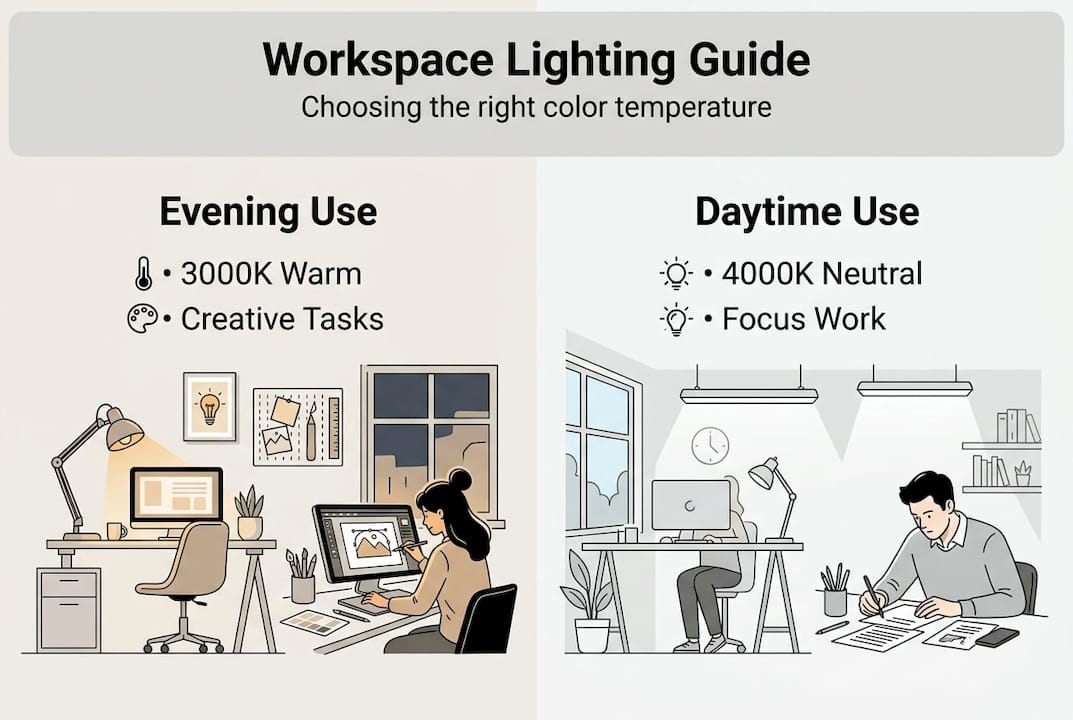
Research also confirms that warmer vs. neutral light preferences vary significantly from person to person and even by the specific activity being performed. Some people thrive under the warm glow of 3000K, while others perform better under the crisper light of 4000K. There's no universally "correct" answer!
Personalization is key here, and it matters more than most people realize. Several factors influence your ideal lighting setup:
- Task type: Detail-oriented tasks (like coding or editing) demand brighter, cooler light than more open-ended tasks like brainstorming sessions.
- Time of day: Cooler light is ideal for supporting alertness in the morning, while warmer light eases the transition to evening. Consider investing in smart bulbs that automatically adjust throughout the day!
- Age: Unfortunately, as we age, our eyes typically need higher illuminance levels to achieve the same level of visual comfort. Keep this in mind when selecting bulb wattages or lumens.
- Room size and surface color: Dark walls absorb light, meaning you'll need stronger fixtures to compensate. Lighter walls reflect light, making the space feel brighter.
Pro Tip: If you share a workspace with others, invest in individual, adjustable desk lamps. This allows each person to customize their brightness and color temperature preferences without impacting the entire room. Everyone wins!
A one-size-fits-all approach simply won't cut it. Two people sitting at the same desk can have genuinely different lighting needs based on their age, vision, and the tasks they're undertaking. Recognizing this inherent variability is the first, and most crucial, step toward creating a workspace that truly supports *you*.
Assessing Your Current Workspace and Lighting Needs
Before you rush out and buy a single new bulb, you need to take an honest, critical look at your current setup. Skipping this step is the #1 reason why people upgrade their lighting and *still* end up feeling dissatisfied.
"80% of people rate lighting as highly important for their well-being, yet satisfaction levels vary substantially by gender and age, highlighting the critical need for a personalized assessment."
Start with a structured evaluation using this checklist:
| Lighting factor | What to check | Target |
|---|---|---|
| Brightness | Use a free lux meter app on your smartphone (search your app store) | 300 to 500 lux minimum on your work surface |
| Color temperature | Check the bulb packaging (look for the Kelvin "K" value) | 3000K to 4000K for general workspace use |
| Fixture placement | Look for shadows on your work surface while you're sitting in your normal position | No shadows on your primary task area |
| Daylight access | Note the direction of your windows and the times of day when you get the most natural light | Supplement with artificial lighting as needed, especially during cloudy days or evenings |
| Glare sources | Check for reflections on your monitor screen from windows or light fixtures | Minimize or eliminate direct glare on your screen |
Here's a more detailed, numbered process for completing your assessment:
- Measure your current light levels. Download a free lux meter app on your smartphone and take readings at your desk surface at different times of the day. This will give you a baseline to compare against after you make changes.
- Identify your primary tasks. List the three activities you do most often in your workspace and note whether they require fine detail (e.g., coding, drawing) or general awareness (e.g., meetings, brainstorming).
- Check your fixture placement. Sit at your desk and look for shadows. If your dominant hand casts a shadow on your work area, your light source is probably in the wrong position. Consider repositioning the light or adding a second light source.
- Note your daylight patterns. Track when natural light enters your workspace and from which direction. This will tell you when supplemental lighting is most critical.
- Evaluate glare. Sit in your normal working position and look at your monitor. If you see distracting window reflections or glare from light fixtures, your setup needs adjustment. Consider using window coverings or repositioning your monitor.
Common mistakes people make during this assessment phase include relying solely on a single overhead ceiling fixture, ignoring glare from windows or screens, and choosing bulb color based purely on aesthetics rather than function. Avoiding these three errors will get you a long way toward a well-lit workspace.
Also, take a moment to consider your personal goals. Are you primarily optimizing for deep focus, professional appearance on video calls, creative inspiration, or a space that can easily transition between work and relaxation? Your answer to this question will shape every decision that follows. Reviewing some solid workspace lighting tips from reputable design sources can help you translate your goals into specific fixture and bulb choices *before* you spend a single dollar.

Step-by-Step: How to Optimize Workspace Lighting
With your assessment complete, you're finally ready to make changes that will actually make a difference! Follow these steps in order for the best and most consistent results:
- Establish your baseline. Record your current lux readings (using your lux meter app) and note the specifications (wattage, color temperature) of your existing bulbs. You need a starting point to measure improvement.
- Replace existing bulbs with LEDs at the right color temperature. For focused work, switching to 4000K LED lighting has been linked to better sleep and less daytime dysfunction in numerous studies. If you only do one thing, start here!
- Add task lighting. A dedicated desk lamp aimed at your primary work surface reduces your reliance on overhead fixtures. Position it to the side of your non-dominant hand to minimize shadows.
- Layer your lighting. Effective workspace lighting uses three layers working together:
- Ambient lighting: General illumination from ceiling fixtures or floor lamps.
- Task lighting: Focused light specifically for your desk, reading area, or screen work.
- Accent lighting: Softer light that reduces the contrast between bright screens and darker walls, reducing eye strain. Consider a lamp that shines upwards, or even some strategically placed LED strip lights.
- Add smart controls. Dimmer switches and programmable smart bulbs allow you to adjust color temperature and brightness throughout the day without physically changing fixtures. This is one of the most impactful upgrades you can make for the cost.
- Verify your results. Remeasure your lux levels and, more importantly, pay attention to how you *feel* after one week. Adjust from there based on your comfort and productivity.
Pro Tip: Program your smart bulbs to automatically shift from 4000K in the morning to 3000K after 6 PM. This subtle change helps support your natural sleep cycle without requiring manual adjustments.
For fixture inspiration that complements your workspace style, browse industrial office lighting options for a raw, functional aesthetic, or explore modern office lighting for cleaner, more minimalist designs. Choosing the right fixture style ensures your lighting upgrade looks as good as it performs.
Key Stat: Studies have shown that participants who switched to 4000K LED setups reported measurable improvements in sleep quality and a reduction in daytime dysfunction within weeks, not months. That's a fast return on investment!
Personalized Lighting: Visualization Tools and Advanced Recommendations
Getting the fundamentals right is a great start, but the real magic happens when you leverage modern tools to personalize your lighting setup *before* you commit to any purchases.
AI-powered apps and augmented reality (AR) visualization tools now allow you to preview exactly how a new fixture or bulb will look in your actual room. You simply upload a photo of your space, select a lamp from a virtual catalog, and see a realistic rendering of how it will appear in context. This effectively eliminates the guesswork that often leads to expensive returns and frustrating trips to the hardware store.
Here's a quick comparison of different approaches to lighting selection:
| Approach | Time investment | Risk of error | Personalization level |
|---|---|---|---|
| Trial and error (buying and returning) | High | High | Low |
| Expert consultation | Medium | Low | Medium |
| AI visualization tools | Low | Very low | Very high |
Personalized recommendations also lead to greater long-term satisfaction. When your lighting is tailored to your specific preferences and tasks, rather than a generic standard, you're far more likely to maintain good habits and create a workspace you genuinely enjoy being in. Think of it as the difference between a tailored suit and something off the rack!
However, there's one important caveat to keep in mind: while personalized lighting systems can lower energy consumption, users sometimes select brightness levels that fall below the recommended 500 lux standard. Remember that comfort and adequacy aren't always the same thing. If your workspace *feels* fine but you're still experiencing eye fatigue or afternoon energy dips, your chosen brightness might be the culprit, even if it feels pleasant in the moment. Don't be afraid to experiment with slightly higher brightness levels!
Key benefits of using visualization tools before making a purchase include:
- Seeing scale: A lamp that looks perfectly sized in a product photo can appear either tiny or overwhelming in your actual room. Visualization tools help you avoid those surprises.
- Testing color temperature visually before buying: Color temperature can be hard to judge from online descriptions. Visualization tools allow you to see how different color temperatures will affect the look and feel of your space.
- Matching fixture style to existing furniture and wall colors: Ensure that your new lighting seamlessly integrates with your existing decor.
- Reducing decision fatigue by quickly narrowing down your options: With so many choices available, visualization tools can help you quickly identify the fixtures that are most likely to work well in your space.
For guidance on choosing workspace lighting that balances both functional needs and aesthetic preferences, combining visualization tools with thorough research gives you the most reliable path forward. Check out resources from organizations like the Illuminating Engineering Society (IES) for more in-depth information.
Our Perspective: Avoiding Perfectionism in Lighting—What Actually Works for Real Spaces
Here's a secret that most lighting guides won't tell you: obsessing over perfect lux numbers and precise color temperature specifications can sometimes make your workspace *worse*, not better.
We've seen it happen time and time again. Someone reads that